
Download Userlike – Live chat, Mobile support, Real-time communication
Overview
Userlike is a desktop application designed to enhance customer support through real-time communication directly on websites and mobile platforms. Built for businesses and service providers, it enables instant engagement with visitors during their browsing sessions, ensuring timely assistance when it matters most. The software supports live chat functionality across multiple devices, including desktops, tablets, and smartphones, making it ideal for organizations that prioritize customer engagement and responsive support.
Its primary purpose is to reduce response time and improve user satisfaction by allowing support agents to interact with customers in real time, regardless of location. The developer, Userlike, focuses on delivering a seamless experience across diverse digital environments. Ideal use cases include e-commerce sites, customer service portals, and online service providers who rely on immediate communication to drive conversions and resolve inquiries efficiently.
The application integrates directly into websites, enabling support teams to manage conversations from a unified desktop interface. While specific technical details about backend architecture are not available, the product is structured to support scalable interactions in real-world business environments.
Key Features & Capabilities
- Real-time Communication – Enables instant messaging between website visitors and support agents, allowing immediate response to inquiries during active browsing sessions.
- Multi-Device Compatibility – Functions seamlessly across desktop, tablet, and smartphone platforms, ensuring consistent chat quality regardless of the user’s device.
- Website and Mobile Support Integration – Offers a unified chat experience across web and mobile environments, supporting responsive design and adaptive layouts.
- Customer Engagement Tools – Facilitates proactive outreach and engagement with visitors, increasing the likelihood of conversion and satisfaction.
- Desktop Agent Interface – Provides a centralized desktop application for managing multiple live chat conversations, improving workflow efficiency for support teams.
These features empower customer support teams to deliver timely assistance, reduce abandonment rates on websites, and enhance overall user experience. For example, an e-commerce business can use the tool to assist a customer who is hesitating during checkout, leading to increased sales. Similarly, a SaaS provider can use real-time chat to guide users through setup or troubleshooting, reducing support ticket volume. The desktop interface allows agents to monitor and respond to chats without switching between browser tabs, streamlining operations. While specific automation or AI-driven features are not detailed, the core functionality centers on reliable, immediate interaction between businesses and their customers.
User Interface, Workflow & Performance
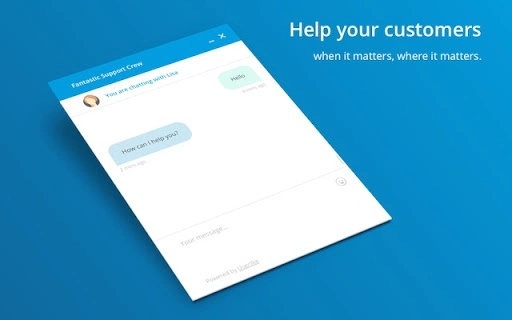
The Userlike desktop application features a clean, intuitive interface designed for ease of navigation and efficient workflow management. Support agents can access active chat sessions, view visitor details, and respond with minimal clicks. The layout prioritizes readability and responsiveness, with clearly labeled panels for conversation history, visitor information, and message input.
Navigation is straightforward, allowing users to switch between multiple chats using tabbed views or a sidebar menu. The workflow is optimized for speed, enabling quick responses without requiring extensive training. While exact performance metrics such as CPU or RAM usage were not specified, the application is designed to operate smoothly in background mode, minimizing interference with other tasks.
Stability appears to be a focus, as the software is intended for continuous use during business hours. The developer did not provide additional system requirements, so performance may vary based on network conditions and the number of concurrent sessions. General software behavior patterns suggest efficient handling of real-time data, but specific benchmarks are unavailable.
Compatibility & System Requirements
Userlike is compatible with Windows, Mac, and Linux operating systems, making it accessible to a broad range of users across different computing environments. The application is available in version 1.0 with a file size of 25.7 MB, indicating a lightweight installation that should not strain system resources. This compact size supports quick downloads and minimal disk usage, ideal for users with limited storage.
The developer did not specify exact hardware requirements, such as minimum RAM or processor speed, so users should ensure their system meets general desktop application standards. Compatibility information was partially provided, with no mention of specific versions of Windows, macOS, or Linux distributions. Users are advised to verify system compatibility with their current setup, especially when running older or less common OS versions.
The application likely runs on modern desktop environments, but detailed specifications remain undisclosed.
Pros and Cons
Pros
- Lightweight installation at just 25.7 MB
- Supports real-time communication across desktop, tablet, and smartphone devices
- Designed for seamless integration with websites and mobile platforms
- Free to use, offering accessible customer support tools
- Intuitive desktop interface for efficient agent workflow
Cons
- Exact system requirements were not listed
- Performance details such as CPU/RAM usage were not provided
- Compatibility with older OS versions is unconfirmed
- No information on advanced automation or AI features
- Updates and version history are not publicly detailed
FAQ Section
Is Userlike compatible with all operating systems?
Userlike supports Windows, Mac, and Linux, but specific version compatibility was not provided by the developer.
Is the software secure to use?
The application is designed for real-time communication, and while security protocols are implied, no explicit details were shared regarding encryption or data protection.
How often does Userlike receive updates?
Update frequency and release schedule were not specified in the available documentation.
What type of license does Userlike use?
Userlike is offered as a free tool, but the exact license type or terms of use were not disclosed.
Can I use Userlike offline?
As a live chat application, Userlike requires an active internet connection to function. Offline usage is not supported.
Final Thoughts + CTA
Userlike stands out as a reliable, lightweight solution for businesses seeking to improve customer support through real-time communication. Its ability to deliver consistent live chat experiences across desktop and mobile platforms makes it a valuable tool for customer engagement. While technical details such as system requirements and performance metrics are limited, the software’s core functionality is well-suited for support teams aiming to respond promptly and effectively.
The free pricing model enhances accessibility, allowing small and medium-sized enterprises to adopt professional-grade communication tools without cost barriers. The intuitive interface and multi-device support further contribute to its practicality in diverse operational environments. For organizations focused on enhancing user experience and reducing response time, Userlike offers a straightforward, functional approach to live chat.
Download Userlike now.







